
Last Updated on May 11, 2025 by g6nhu
I enter a fair number of contests, for voice contests I’ve always used SkookumLogger, for data contests I’ve always used Fldigi and the less said about what I use for CW the better!
I’ve always worked non assisted in contests, even those where there is no non assisted section and so therefore I’ve always been at a bit of a disadvantage but despite that, I’ve done well. If you’ve never seen it, there’s a page on this blog which details all my contest entries since 2011.
You’ll notice that the majority of my entries are single band on 15m. 15m is my favourite band and I like contesting there, especially as it means I can get some sleep as it closes down overnight. Of course that also means I have the boredom of hardly working anyone during the troughs of the solar cycle and if conditions are poor.
CQ WPX RTTY this year was a bit of an eye opener. I normally like to run during data contests but for this one, I made a point of tuning up and down the bands a bit and working what I heard as well as just sitting on a frequency and calling CQ. As a result, I had more QSOs than I’ve ever had during a contest, over 800 on just 15m. The contest hasn’t been scored at time of writing so even though my raw score of 1,040,608 is just slightly above the G 15m record, it will be lower after adjudication as I’m sure there will be some busted QSOs. Realistically, I probably only needed twenty more QSOs to have beaten that record.
That got me thinking. If I can do that unassisted, what can I do assisted? I really should connect to my own DX Cluster and use that for assisted entries in contests. But the question remains, what software should I be using which gives me good decodes and cluster integration?
Realistically, there’s nothing for the Mac that will do this so I decided to look at Windows software. I have a little Dell PC in the shack running Windows that I use for things like SH5 and Contest Log Checker so it was a simple matter to look at what seems to be the most popular and give that a try.
N1MM Logger+ jumped out as the obvious choice. It’s widely used and seems to be very popular so I downloaded it, installed and then just looked at it with absolutely no idea what to do next.
Google was clearly going to be my friend and it didn’t take long to find this guide by Don AA5AU which I followed letter by letter. I much prefer guides written like this over video guides as one can work through them slowly without having to faff about pausing, trying to work out what’s happening on screen or interpret what the other person is saying. Give me a good written guide any time.
I had a few issues getting everything talking between the computer and the radio but eventually I got everything installed and working thanks to a couple of friends who were able to assist. One of the things I was very keen to do was to run RTTY on my TS-890S using FSK rather than AFSK.
I’m using N1MM Logger+ with five RTTY decode windows. MMTTY, Gritty and three 2Tone instances. One of the problems I always had with Fldigi was decodes. It would decode most stuff but from time to time, I just found myself asking for repeats over and over again which is frustrating for me, but very frustrating for the other station as well. I hoped that running multiple decoders would help get around this problem and as a result, I’d get fewer busted contacts due to decode errors.
With the software up and running, I then needed to get my head around it and familiarise myself with how to actually use it. I spent days metaphorically flicking through the documentation and understanding how it all worked. I made a lot of changes to the default digital macros to get them to a base level where I can manually tweak them for each contest I do. Many years ago I wrote a blog piece about the anatomy of an ideal data contest QSO and I still stand by that today so that’s what I’ve based my new ones on.
Using Fldigi, the three function keys F1, F2 and F3 were how I conducted each QSO. F1 to call CQ, F2 to send the exchange and F3 to log the contact. I could just have replicated that in N1MM but instead I’ve embraced the concept of ‘Enter Sends Message’ and now find myself mainly hitting F12 to grab and then Enter to send the appropriate message. Once I’d got my head around that, everything else is pretty basic.
For the last three months or so, I’ve been working RTTY contests using N1MM to simply get the hang of operating with it, really just for practise. I’ve put entries into some and in others, I’ve just worked for a couple of hours and then put in a check log. Each time I use it, I find myself getting more familiar with the operation and changing the way I do things slightly for speed and accuracy.
I was right about the extra decoders. I can have stations calling that one window doesn’t decode but another one does, the same for contest exchanges. It’s really reduced my call for repeats and it also shows how Fldigi can struggle a little bit if someone is slightly off frequency, despite having the AFC enabled. I’ve never had an instance with N1MM where someone is so far off my frequency that I can’t decode them.
I connect to the PC from my Mac using Remote Desktop and so I’m using a decent 27″ 5K screen which gives me plenty of space. This is how I’m using it (click this image for a full size version).
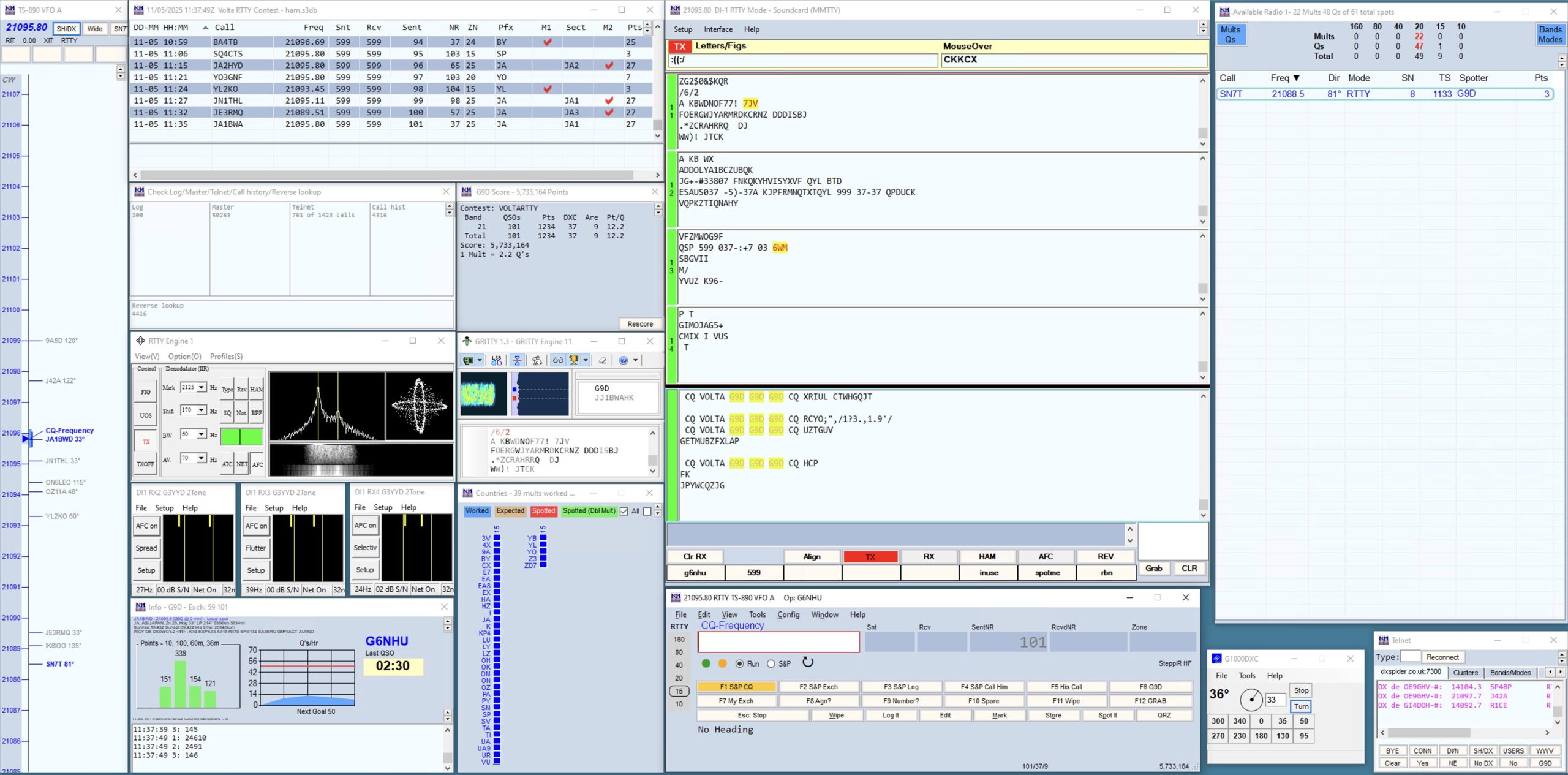
I grabbed that screenshot during the VOLTA RTTY contest which was a real struggle to work as conditions have been very poor this weekend. You can see the SH5 analysis of my log here.
If you have any comments about this layout or suggestions of things I can change to make me more efficient, please post them below.
All in all, I feel that I’m progressing nicely with N1MM Logger+, it’s a massive improvement over Fldigi for data contests and I’m looking forward to using it later in the year in CQ WW RTTY. I’ll be doing other contests between now and then so if you see G9D calling CQ, please work me and then spot me on the cluster afterwards.
